
Maritime
Starlink on Nigerian Coastal Vessels: Choosing a Plan for Territorial and International Waters
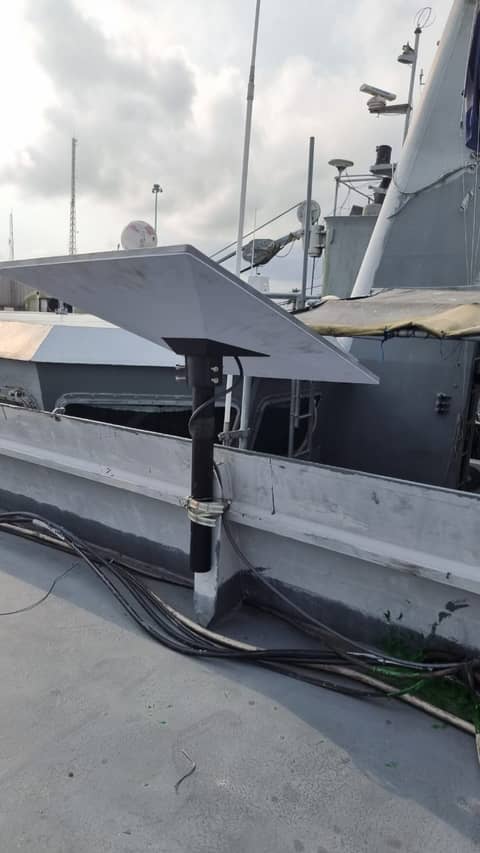
Choose the plan from where the vessel actually works, not from the name that sounds largest. If you stay inside coastal and inland waters, a Roam plan may be enough. When you leave those waters, Ocean Mode or Global Priority is the question, and they are not the same product.
This page is a route check for Nigerian coastal craft and support boats. It is not a repeat of the Ocean Mode guide. That guide separates Ocean Mode from a 50GB Global Priority block. Read it before you brief a crew on a data cap.
Checked on 20 November 2026 against Starlink's public Roam page and Maritime page. The Ocean Mode help article did not return body text to a plain fetch that day. Legal lines below come from Nigerian statutes, not from Starlink.
What the link has to do near shore and offshore
Near shore, the usual jobs are port calls, creek runs, and short coastal legs. Voice, mail, and a chart update can be modest if the sky is clear.
Offshore, the same jobs run for days. Crew phones stay on. Uploads do not pause at sunset. A plan that is fine at the berth can be the wrong class once the vessel stays out.
Write the route first. A pilot boat that sleeps in Lagos is not an OSV on a three-week charter. Hardware still has to see the sky. A plan cannot fix a blocked sky. Mount notes are on boat installation and offshore installation.
Two maps, not one
Nigeria's legal zones
This is not legal advice. Confirm zones with counsel or NIMASA if a charter turns on them.
Nigeria's Territorial Waters Act, as amended in 1998, sets the territorial sea at twelve nautical miles. The measure is from the low-water mark, or from the seaward limit of inland waters.
The amendment text is on the UN law-of-the-sea page. The Act text is in the FAOLEX copy.
The Exclusive Economic Zone Decree of 1978 sets a zone out to 200 nautical miles from the baseline. Borders with neighbouring states can pull that line in.
Water past the EEZ is the high seas in the usual law-of-the-sea sense. People often say international waters for anything outside 12 miles. That everyday phrase is not the high seas.
Starlink's product line
Starlink's Roam page says Roam covers coastal and inland waters. It says international waters need Ocean Mode. Frequent ocean travel is pointed at Maritime.
A trade note of the Ocean Mode help page, dated 6 October 2026, treats that switch as about 12 nautical miles. The help page itself did not return body text on 20 November 2026.
Do not brief a mile count from that trade note. Read the distance and any charge in the account before you sail.
A matching number does not make the legal line and the product line the same rule. You can be inside Nigeria's EEZ and already outside the line Starlink calls coastal.
You can also be inside the territorial sea and still be on a plan that will not stay up for a long job. Check both maps. Do not collapse them into one sentence for the captain.
Which plan class to compare
Planning aid only. The account screen is the rule for your line.
| Where you work | What to open in the account | What not to assume |
|---|---|---|
| Inland creeks and the berth. | A fixed or Roam class, if the screen offers it. | That a home dish is a sea terminal. |
| Coastal water the account still calls coastal. | Roam, if hardware and the route match. | That coastal use is unlimited in time. |
| Past the account's coastal line, now and then. | Ocean Mode, only if that toggle exists. | That Ocean Mode is a 50GB block. |
| Out for the whole charter. | Global Priority, if the kit is eligible. | That a roam add-on replaces it. |
Day limits on Roam in coastal water show up in some write-ups of Starlink's help text. They were not readable from the help page in this check. If the account shows a day counter, use that counter.
Global Priority is the class Starlink presents for ocean use without the Roam time cap. How a priority block behaves after it runs out is in the Ocean Mode guide. This page does not restate that product note.
Activation steps for a travelling account are in the Roaming and Global Priority guide.
Data allowance and the bill
Ocean Mode, when the account offers it, is a usage charge while it is on. Switch it off when you no longer need it. Leaving it on can keep the usage charge running, including back in port.
Global Priority is a monthly plan with a data block. The block size is on the account. A larger block costs more. This site does not print a naira price for either product.
Starlink sends the subscription bill. DataGram does not resell the subscription. A quote from us for install work is not the Starlink invoice.
Crew caps on a router are your rule. They do not change the Starlink bill. Plan that split in the ship data guide.
Questions to answer before you deploy
1. Does the vessel stay in coastal and inland water for the whole job?
2. Does any leg pass the line the account calls international water?
3. How many days is the vessel away from the berth?
4. Is the link for the bridge, the crew, or both?
5. Which kit is on the account, and does that plan accept it?
6. Is a VSAT or mobile path staying as the second link?
7. Who reads the data meter each week, and where is that note filed?
8. Does the charter name a plan, or does it only say unlimited?
If you cannot answer 2, 5, and 8 from the live account, do not sail on a forum screenshot.
When installation and plan help are worth it
Book a survey when the mount, the cable path, or the power feed is not obvious. Salt, crane sweep, and a generator changeover are normal on Nigerian support boats. They are not a rooftop job.
Ask for plan help when the account lists more than one maritime name and the route crosses the coastal line. The wrong class shows up after the vessel has left, which is a bad time to learn it.
Deck work and plan help are separate charges. Start from offshore maritime installation or boat installation. Contact DataGram with the route and the plan name on the screen.